
The smg360 dashboard provides a single location for resetting a smg360 user’s password.
Users can reset their own password by using the Forgot Password button on the smg360 log-in page and change their password once successfully logged into smg360. A password can be updated by the smg360 user, SMG Account Team member, or the brand administrator.
Single Sign-On
If your account is set up with single sign-on (SSO) users within your organization will log into the reporting website without having to enter a username or password.
This article covers the following topics:
- Password Criteria
- Resetting your smg360 password
- Changing your smg360 password
- Resetting another smg360 user’s password
Prerequisites
- Access to User Administration in smg360
Password Criteria
Password must be 8-16 characters and meet all of the following criteria:
- Password needs at least one uppercase letter
- At least one lowercase letter
- At least one number
- At least one special character (e.g., #, $, &)
- Passwords cannot contain the User’s username
Reset Your smg360 Password
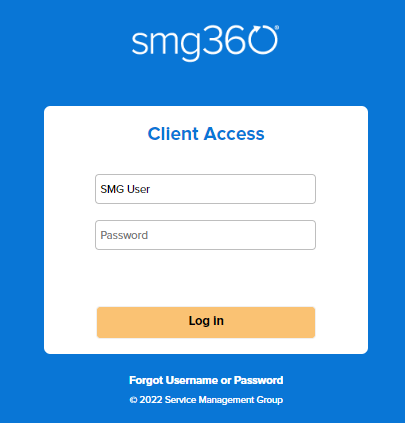
- Navigate to smg360 reporting website.
- Click Forgot Username or Password.
- Select Forgot My Password in the Login Retrieval option box.
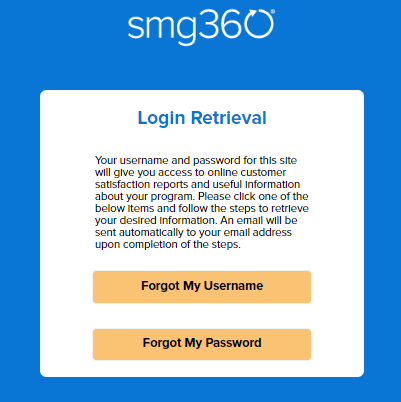
- Enter
- Click Submit; an email will be sent to the email address associated with the user with steps to reset the password.
Note: If you do not receive an automated email with your password within 30 minutes, please contact the Helpline Team.
Change Your Own smg360 Password
- Log in to the smg360 reporting website.
- Hover over the gears icon on the top toolbar and click Settings.
- Click Account located in the options on the left of the page.
- Under Update Password, enter your current password, then enter new password, and confirm new password.
- Click Save.
To Reset Another smg360 User’s Password
- Log in to the smg360 reporting website.
- Hover over the gear icon
 on the top toolbar.
 - In the drop-down click
 .
. - Click User Administration located in the options on the left side of the page.
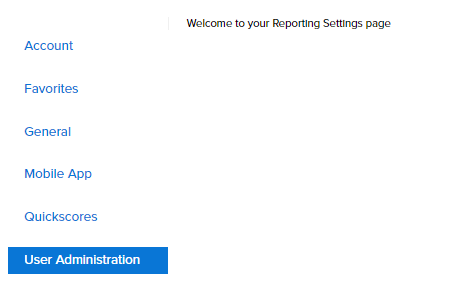
- Users highlighted in blue can be edited. Select the user to edit by clicking on any of the highlighted fields of the user’s row.
- In the Edit User box select or edit the information to change.
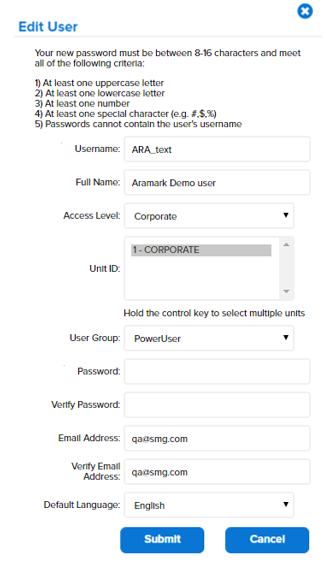
- Password: Reset password here
- Verify Password: Reenter the above password to reset
- Click Submit.
Only SMG Account Team members and brand-level admins have access to reset another smg360 user’s account within their specific brand account.
Comments
Please sign in to leave a comment.